Ultimate eDPI Calculator for Precise Gaming Sensitivity Settings
Professional-grade tool to accurately calculate your effective DPI (eDPI) for optimal gaming performance
eDPI Calculation
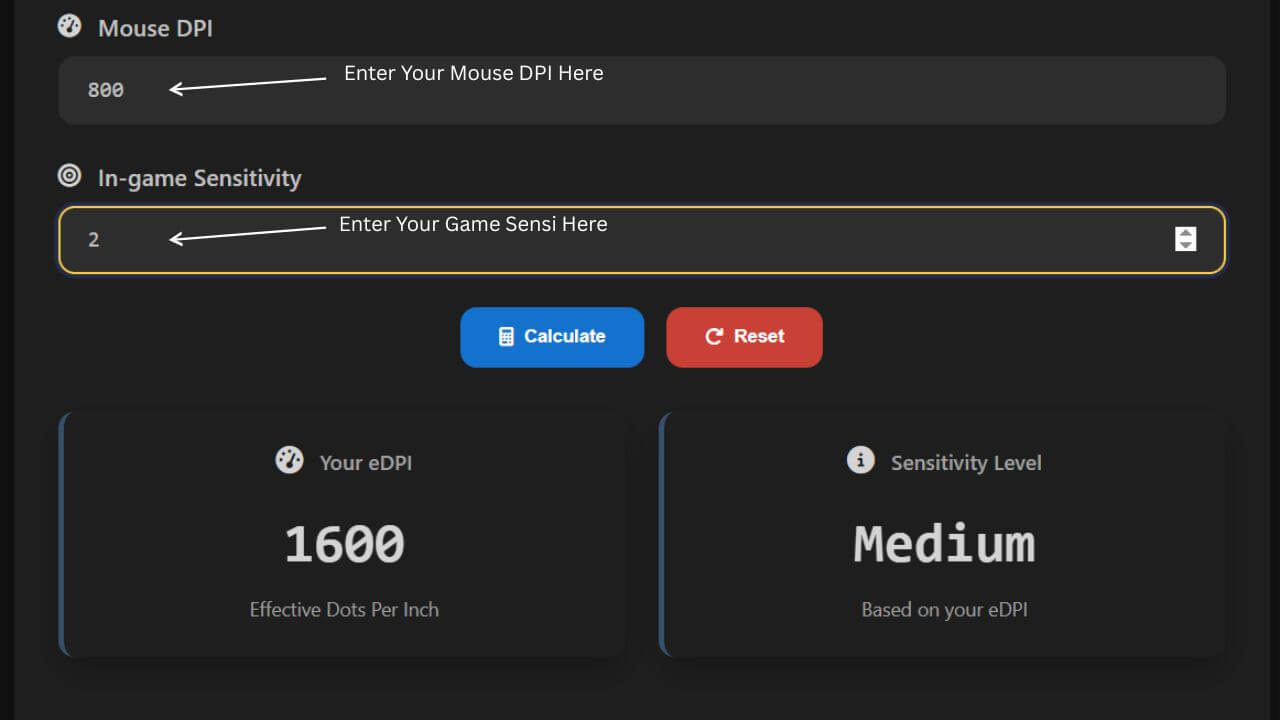
eDPI (effective Dots Per Inch) is the product of your mouse DPI and in-game sensitivity. It's the true measure of sensitivity that allows for comparison across different games and setups.
eDPI = DPI × In-game Sensitivity
Your eDPI
Sensitivity Level
What is DPI?
When using an eDPI calculator, it is compulsory to understand what DPI means. It actually stands for dots per inch, also known as CPI, and it states the pixels your cursor has traveled across the screen when you move the mouse one cm on a table. You can also change this setting with a button or through software from the manufacturer, which adjusts how it feels when holding the mouse while using Windows, playing games, or browsing the web.
Pro gamers usually like the DPI between 400 and 1600 for ideal in-game performance. A higher DPI can cause the sensor to be pushed beyond limits, which causes a smoothing issue, where it predicts movements and ignores raw input. Keeping a balanced sensitivity is key. Finding the perfect ground helps in maintaining precision, consistency, and smoother control during matches.
What is sensitivity?
Sensitivity is an in-game setting that allows players to increase mouse DPI for a specific game and adjust the aim using a reliable method. It's a way of increasing sensitivity rather than simply raising high levels for control and balance. Every gamer knows different games often use their own sensitivity settings, and the same numbers mean two things depending on the title.
Because of this variation, a general setting is needed to compare performance with friends or immediately change to new preferred setups.
What is eDPI, and how to calculate it?
eDPI stands for Effective Dots Per Inch and is calculated by multiplying the Mouse DPI by the In-game Sensitivity
eDPI = DPI × Sensitivity.
It gives an accurate overall measure that determines how fast the cursor moves, helping gamers compare sensitivities across players using different values, hardware, or software. Both settings directly affect aim speed and are multiplied together for accuracy.
An eDPI calculator makes it easy to find exact sensitivity by automating the process because:
- It's 100% Free To Use.
- Supports Most Popular Games.
- Useful for every level of player.
Whether you're adjusting, testing, or trying to match a favorite pro's setup, this method keeps everything consistent and fair.
Visual Guide: How eDPI Calculator Works
Formula Visualization: eDPI = DPI × In-game Sensitivity. Multiply your mouse DPI by your game sensitivity to find your effective sensitivity for consistent aiming across different games.
How to calculate the eDPI for CS: GO?
In CS: GO, an eDPI calculator helps players adjust the mouse sensitivity to get precise aiming and avoid sprays during fights. Pro players prefer lower settings than casual gamers, since CS: GO requires high real sensitivity compared to the other competitors. The average professional eDPI stays under 900, though some manage to reach world elite levels with a value over 1500.
This range is good when you use the tool to find steadiness, comfort, and movement. No matter whether you are playing casually or competitively, finding the right balance between control and speed is key to ideal performance.
How to calculate the eDPI for Fortnite?
Fortnite requires precise aim for shooting and building, making finding the right eDPI essential. Pros recommend a low range for better control and quick movements. In 2019, the common eDPI ranged between 32 and 82 among 300 or more than 300 pro players and streamers, which was an ideal scale for consistent accuracy and faster edits.
To use this tool as a Fortnite eDPI calculator, enter the value of your sensitivity, since Fortnite describes sensitivity in %. Remember to specify the setting before calculating to maintain stable, smooth performance and control throughout gameplay.
How to calculate the eDPI for Valorant?
Valorant, an FPS game with low time to kill, demands precision and perfect aim. A single bullet missed can leave you defeated, so a lower eDPI is preferred to guarantee control. Pro players usually maintain an average of around 280, staying accurate and consistent in every encounter.
To use this tool as a Valorant eDPI calculator, keep those values in mind when you are adjusting the setup. Experimenting within this range helps you find stability, smooth movement, and better performance during high-pressure moments.
How to Use the eDPI Calculator
It is simple to learn how to use the eDPI calculator, which helps you match or improve your aim across games like CS: GO, Valorant, and other FPS games. Follow the steps below to calculate your eDPI value accurately using your DPI and sensitivity settings.
| Step | Action |
|---|---|
| Step 1: Check Your Friend's Settings | Start by checking your friend's settings. For example, if their DPI is 1000 and their sensitivity is 0.8, you can calculate the value using the formula: eDPI = DPI × sensitivity eDPI = 1000 × 0.8 = 800 This equals 800, meaning your friend's eDPI is 800. |
| Step 2: Match Your Settings | Now check your own settings. If your DPI is 500, you can find the needed sensitivity by dividing: sensitivity = eDPI ÷ DPI sensitivity = 800 ÷ 500 = 1.6 This gives 1.6, so you can set the same type of control in your game for accurate aim and consistent performance. |
| Step 3: Verify and Select the Correct Game Type | To get accurate results, verify or select the right pre-selected type in the calculator. It often auto-selects Valorant (number scale), but you can leave it as is or choose another format if needed. This ensures the formula works for your chosen game's decimal sensitivity format. |
| Step 4: Enter Values and Let the Calculator Work | Enter your in-game sensitivity, then enter your current mouse DPI, and let the math do the rest of the process. Once done, the calculator instantly shows your eDPI value. Example: If you're using DPI 800 and sensitivity 0.5, then: eDPI = 800 × 0.5 = 400 |
What is the BEST eDPI to use?
There isn't a single best eDPI for everyone because it depends on what feels most comfortable with your mouse sensitivity and DPI. Some players prefer low values, while others use high ones, which depend upon the game, their playing style, and setup.
Generally, games that need precise cursor movement perform better with a lower eDPI, while fast, big movements benefit from a higher one. Every player has a unique value that shows true in-game sensitivity, which may vary without knowing specific settings. You can compare with pro players or friends to find the right balance for smoother control and aiming consistency.
How is eDPI useful?
The eDPI calculator helps players compare in-game sensitivity in a better and more accurate way. For example, imagine you play Valorant with 0.340 sensitivity and an 850 DPI mouse, while your friend uses 0.170 sensitivity with a 1700 DPI setup. Even though your sensitivity seems two times higher, you're both moving the same distance for a 360-degree no-scope kill. When you calculate eDPI, you'll find 289, which proves how useful it is instead of comparing sensitivity directly.
To take another example, look at 3 Valorant players with different DPI and sensitivity combinations. The table below shows how their eDPI values vary based on movement and mouse settings:
| Player | DPI | Sensitivity | eDPI |
|---|---|---|---|
| 1 | 850 | 0.340 | 289 |
| 2 | 1700 | 0.340 | 578 |
| 3 | 1700 | 0.170 | 289 |
As seen, Player 2, with a higher DPI, makes less physical movement to perform the same action, denoted by a higher value. On the contrary, Player 3, with lower sensitivity, still matches Player 1's movement, as indicated by both having the same eDPI.
FAQs About eDPI Calculator
What is DPI?
DPI (Dots Per Inch) measures how many pixels your mouse pointer moves on screen per inch of physical mouse movement. Higher DPI means the cursor moves faster, while lower DPI means slower, more precise movement. It's a hardware setting affecting sensitivity but doesn't tell the whole story of in-game sensitivity. Gamers adjust DPI based on personal preference and game requirements.
Can you compare eDPI settings between games?
Yes, eDPI (effective DPI) helps compare mouse sensitivity across different games by multiplying your mouse DPI by the in-game sensitivity. It normalizes differences so you can maintain consistent feel when switching games. However, game mechanics and field of view also affect the actual feel, so eDPI is a guideline rather than exact.
Where can I find eDPI calculators for specific games?
You can use tools like clicktestnow.com to calculate and compare your eDPI settings easily. Our tool helps you convert sensitivities for popular games so you can keep consistent mouse control without hassle.
How do you compare mouse sensitivities between different games?
To compare sensitivities, calculate eDPI by multiplying your mouse DPI by in-game sensitivity. Then use a reliable tool like clicktestnow.com to convert that eDPI to equivalent sensitivities in other games. Remember to consider differences in game FOV and input scaling, as they can impact feel even if eDPI matches.
What is the eDPI of 400 DPI and 1.80 mouse sensitivity?
The eDPI is calculated by multiplying DPI and sensitivity: 400 × 1.80 = 720 eDPI. This number represents the effective sensitivity across games and helps to compare or replicate sensitivity settings in other games.
Is mouse acceleration good for gaming?
Mouse acceleration is generally not recommended for competitive gaming because it changes the cursor speed based on how fast you move the mouse, making aiming inconsistent. Most pro players disable acceleration to maintain muscle memory and precision. However, some casual players may prefer it for general use.
Should I choose high or low eDPI?
Choosing high or low eDPI depends on your playstyle and comfort. Low eDPI offers more precision and control, favored by many competitive players, while high eDPI allows faster turning but can reduce accuracy. Experiment to find what suits your aiming style best.
What is DPI and how does it differ from eDPI?
DPI is a hardware measurement of mouse sensor sensitivity, while eDPI (effective DPI) is the product of your mouse DPI and in-game sensitivity. DPI alone doesn't reflect actual cursor speed in-game; eDPI accounts for both hardware and software settings to represent true sensitivity.
What eDPI do professional players use?
Professional players typically use eDPI values ranging from 200 to 800, depending on the game and personal preference. Many FPS pros prefer lower eDPI for better precision, often between 400 and 600. However, there is no one-size-fits-all as comfort and playstyle vary.
How do I find my optical eDPI?
To find your optical eDPI, multiply your mouse's DPI setting by the in-game sensitivity you use. If your mouse software shows your DPI, just multiply that by your current game sensitivity setting to get the effective eDPI value.
What does 360 degree turn mean?
A 360 degree turn means moving your mouse just enough to rotate your in-game character or camera fully around once. It's often used as a measure of sensitivity, indicating how much physical mouse movement is required to spin completely around.