Mouse Sensitivity Converter - How To Switch Games Without Losing Aim
Convert your mouse sensitivity between popular games with professional accuracy
Sensitivity Conversion
About the Mouse Sensitivity Converter
The Mouse sensitivity converter is a free tool which is designed for players who need to convert sensitivities between different games. It supports many conversions and allows you to easily switch settings without losing accuracy. Whether you're adjusting between shooting games or strategy games, this calculator helps maintain consistent control throughout every session, keeping your gameplay stable and smooth.
Its simple design makes it perfect for gamers who value precision and balance. By using this tool, you can convert values very quickly, keeping your aim steady, and enjoy a smoother experience across setups, which ensures that your sensitivity feels right in every game.
How This Sensitivity Converter Works
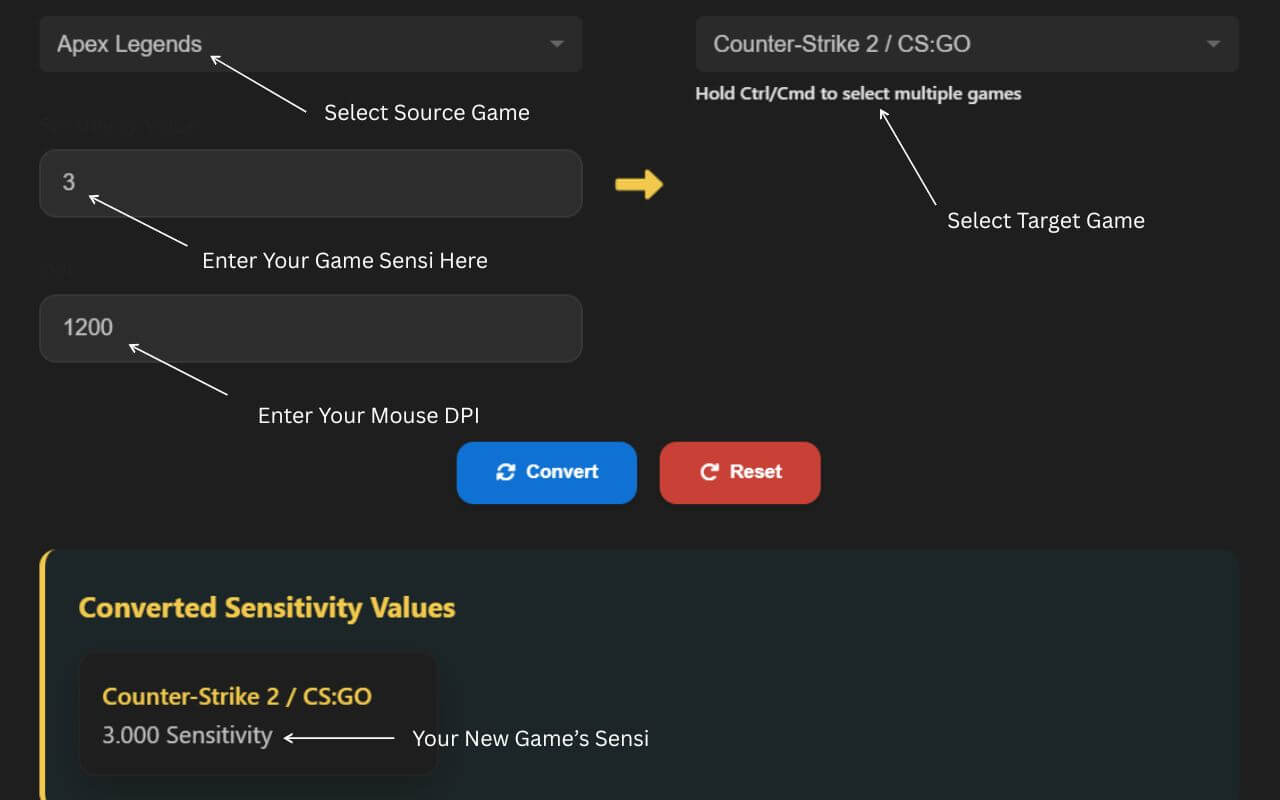
Sensitivity Conversion Interface: Shows the conversion tool with game selection dropdowns, sensitivity input fields, DPI adjustment, and conversion results for transferring settings between different games.
Step-by-Step Guide to Using the Sensitivity Converter
| Step | Action |
|---|---|
| 1 | Select games using the dropdown menu and choose which ones you're converting from and to. This helps the system align settings correctly across titles. |
| 2 | Enter the original sensitivity setting from your chosen game. If your DPI (Dots Per Inch) is different between titles, adjust it by entering the correct values for both the original and target setups to keep precision consistent. |
| 3 | View results, your converted sensitivity will automatically calculate and display on-screen, giving you an instant match between games. |
| 4 | Click Advanced to see details, including eDPI, 360 rotation, and measurements that help refine accuracy and ensure smoother gameplay. |
Why You Need a Mouse Sensitivity Converter
Mouse sensitivity settings often vary significantly across different game engines, even those built on the same engine, which can cause players to perform poorly when switching between games. A Sens converter or aim converter matches sens values accurately to help you play with the same comfort across titles without losing control.
Using this tool isn't always required, but it helps translate the rotational movements of mice across games. It's the recommended method for maintaining consistency and stable accuracy, no matter which setup you're on.
In the original method, users had to calculate DPI, measure distance travelled, and note the 360-degree rotation across different setups. This involved comparing gameA with mouseA, and gameB with mouseB, while taking in-game yaw values to obtain matching results in both cases.
The process was complicated, time-consuming, and full of mathematical calculations. The modern converter is much faster, easier, and is now the preferred tool among FPS gamers to convert sensitivities quickly and efficiently.
FAQs About Sensitivity Converter
What is our sensitivity converter?
Our sensitivity converter is an easy-to-use tool that helps you match mouse sensitivity settings across different games. It calculates equivalent values so your aim feels consistent. This saves you time and frustration adjusting manually. It works with popular games and DPI settings.
Can I convert my sensitivity for a mouse with a different DPI?
Yes, you can convert sensitivity for any mouse DPI. The tool adjusts values based on your current and target DPI settings. This ensures your cursor moves the same distance physically. It's perfect for gamers switching mice or tweaking performance.
Why should I convert my sensitivity?
Converting sensitivity maintains muscle memory across games or devices. It helps you aim accurately without relearning controls. This improves gameplay consistency and comfort. Plus, it reduces frustration from unpredictable sensitivity changes.
What games are supported?
We support many popular games including Fortnite, CS:GO, Valorant, Apex Legends, and Overwatch. The list is regularly updated based on user requests. Our goal is to cover all major FPS and competitive titles. Check the dropdown menu for the full list.
How can I request a new game for the calculator?
If your game isn't listed, you can request it via our contact form or support email. We welcome suggestions and prioritize popular requests. Providing game details helps us add support faster. Stay tuned for updates after submitting your request.
Isn't the tool working properly?
If the tool isn't working or results seem off, try refreshing the page and checking inputs. Ensure your DPI and sensitivity values are correct. Contact support if problems persist. We're here to help and improve the tool based on feedback.